Category: Tools

  • Ultimate AutoShorts Review: Easy Steps to Short-Form Social Videos

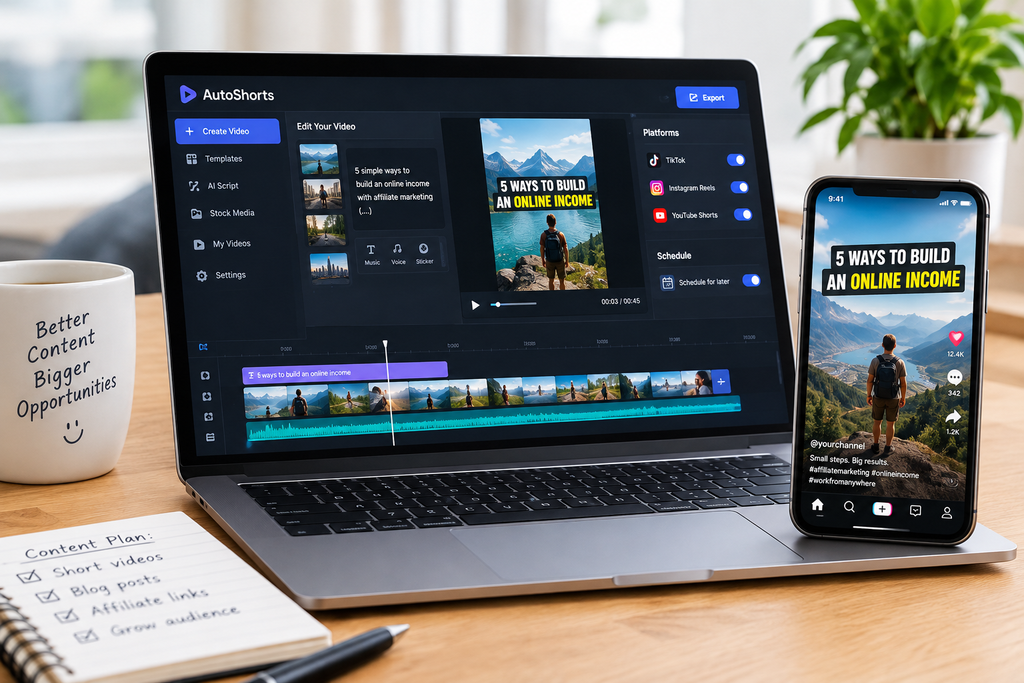
    AutoShorts review showing AI video creation for TikTok, Instagram Reels, and YouTube Shorts.

    For AutoShorts, creating content consistently is one of the biggest challenges when starting an online business. Additionally, you need ideas, scripts, videos, captions, and a publishing schedule.

    Doing everything manually can take hours. This is especially true if you are trying to grow an audience while working on other projects.

    That is where AI video tools can help.

    In this article, we will look at how AutoShorts can help content creators produce short-form videos.

    Additionally, we will examine how it fits into an online marketing strategy and what beginners should consider before using it.

    What Is AutoShorts?

    AutoShorts is an AI-powered video creation tool designed to help creators turn content into short videos for social media platforms.

    Depending on the workflow you choose, AI video tools can help reduce the amount of manual work involved in creating content. AutoShorts is worth exploring if you want to produce videos for platforms such as TikTok, Instagram Reels, and YouTube Shorts.

    For creators interested in faceless content, this type of tool can be particularly useful because it can reduce the need to appear on camera or handle every editing task yourself.

    You can explore the tool here: Visit AutoShorts.

    Why Short-Form Videos Matter for Online Marketing

    Short-form videos offer another way to introduce people to your content, website, or affiliate recommendations.

    For example, if your website teaches beginners about affiliate marketing, you could create short videos covering topics such as:

    • Three common affiliate marketing mistakes.
    • Free tools that help beginners get started.
    • How affiliate links work.
    • Ways to research products before promoting them.
    • Simple strategies for creating useful online content.

    Each video can focus on one specific problem and offer a practical solution.

    You do not need to cover everything in a single video. In fact, focusing on one useful takeaway makes it easier for viewers to understand your message.

    The goal is to attract the right audience by providing helpful information rather than simply asking people to buy something.

    How AutoShorts Can Help You Create Content

    One challenge with social media marketing is maintaining a consistent publishing schedule.

    AutoShorts.ai offers a workflow for creating faceless videos, previewing and customizing the results, and scheduling content for connected channels.

    Here are three ways this type of tool can fit into your content strategy.

    1. Create Faceless Video Content

    Not everyone feels comfortable recording themselves on camera.

    Faceless videos provide an alternative. You can create educational content, business tips, motivational videos, and other niche-specific material without making yourself the center of attention.

    This can be helpful if you are building an online brand but prefer to keep your personal life private.

    2. Spend Less Time on Repetitive Tasks

    Producing every video from scratch involves several steps: brainstorming, writing, editing, adding music, and preparing the final version for publication.

    An AI-assisted workflow can help automate parts of this process.

    However, you should still review your videos before publishing. Check that the information is accurate, the script sounds natural, and the visuals match your message.

    Automation should help you produce better content more efficiently, not replace quality control.

    3. Build a Repeatable Publishing Routine

    Instead of deciding what to post every day, plan several topics in advance.

    For example, you could create a weekly content plan with three themes:

    • Monday: A practical online business tip.
    • Wednesday: A useful tool or resource.
    • Friday: An affiliate marketing lesson for beginners.

    Use AutoShorts to help with your video workflow, then review the finished content and schedule it where appropriate.

    A simple routine is often easier to maintain than trying to publish something new whenever you have a spare moment.

    How to Use Short Videos to Support Affiliate Marketing

    Creating videos is only one part of the process. You also need a strategy for connecting your content with your website and the products you recommend.

    Here is a straightforward approach for beginners.

    Step 1: Choose a specific audience.

    Decide who you want to help. For example, you might focus on people who are learning affiliate marketing without a large budget.

    Step 2: Identify useful topics.

    Answer common questions your audience has. Tutorials, mistakes to avoid, and tool comparisons can all provide useful starting points.

    Step 3: Create short, focused videos.

    Use AutoShorts or another suitable video tool to help produce content. Make sure each video delivers a clear takeaway.

    Step 4: Give viewers a relevant next step.

    Direct interested viewers to a useful article, tutorial, or resource on your website. Follow each platform’s rules for links and promotional content.

    Step 5: Review your results.

    Pay attention to watch time, engagement, clicks, and which topics generate meaningful interest. Use that information to improve future content.

    If you recommend products through affiliate links, disclose your affiliate relationship clearly and honestly.

    Remember that views do not automatically translate into website traffic or sales. Results depend on your content, audience, offer, and overall marketing strategy.

    Is AutoShorts Worth Trying for Beginners?

    AutoShorts may be worth exploring if your main challenge is creating faceless videos consistently and reducing the time spent on repetitive production tasks.

    Before paying for any tool, consider the following:

    • Ease of use: Can you create content without spending hours learning the software?
    • Video quality: Do the generated videos fit your niche and audience?
    • Customization: Can you correct scripts and adjust the results to suit your style?
    • Publishing options: Does the tool support the platforms you intend to use?
    • Cost: Does the price make sense for your current budget and publishing goals?

    Start by testing the workflow and reviewing the results before committing to a paid plan. AI-generated content still requires your judgment, editing, and original ideas.

    You can find out more on the official AutoShorts website.

    Other Tools You May Need

    AutoShorts can be one part of a broader content creation system, but it is not the only thing you need to build an online presence.

    Depending on your goals, you may also benefit from:

    • A website or blog to publish detailed guides and tutorials.
    • Keyword research tools to discover what your audience is searching for.
    • Analytics tools to understand how visitors interact with your content.
    • An email marketing service to communicate with people who choose to subscribe.

    You do not need to purchase everything immediately. Begin with the essentials, learn how to use them effectively, and add tools when they solve a genuine problem.

    Final Thoughts

    Creating consistent content can be challenging when you are starting an online business, especially if you are managing every task yourself.

    AI-powered video tools such as AutoShorts can help simplify parts of the process and make it easier to experiment with short-form content.

    The key is to combine useful tools with a clear strategy. Focus on answering real questions, publishing helpful content, and learning from your results instead of chasing views alone.

    Your next step: Choose one question your target audience asks frequently and turn the answer into a short video. Publish it, measure the response, and use what you learn to create your next piece of content.

    Disclosure: This article may contain affiliate links. If you purchase through one of these links, we may earn a commission at no additional cost to you. Always evaluate a tool based on your own needs and budget.

  • How to Launch Budget Affiliate Marketing with Free Tools

    Starting affiliate marketing doesn’t have to cost a fortune. With free affiliate marketing tools, you can begin without expensive software, a professional team, or dozens of subscriptions.

    What you need is a simple way to research ideas, create useful content, share affiliate links, and attract visitors.

    The good news? Several free affiliate marketing tools can help you do exactly that.

    In this guide, you’ll discover seven free affiliate marketing tools for beginners starting out while keeping expenses low.

    1. Google Trends — Discover What People Are Searching For

    Before creating content, it helps to understand what people are interested in.

    Google Trends lets you explore search interest for different topics over time. You can compare ideas and identify subjects that are gaining attention.

    For example, if you’re considering promoting productivity software, you could compare searches related to time management apps, project management tools, and AI writing assistants.

    How to use it:

    • Enter a topic related to your niche.
    • Compare it with other topics.
    • Look for seasonal trends and growing interest.
    • Use your findings to brainstorm article ideas.

    Visit Google Trends.

    2. Google Keyword Planner — Find Keyword Ideas

    Choosing the right topics can make content creation easier.

    Google Keyword Planner helps you discover keyword ideas and explore estimated search volumes and advertising competition. Access and features may depend on your Google Ads account setup.

    Use it to brainstorm phrases your potential audience might search for, such as “best budgeting apps for beginners” or “how to choose email marketing software.”

    Remember that search volume alone doesn’t guarantee traffic. Focus on answering a specific question better than competing pages do.

    How to use it:

    • Start with a topic related to your niche.
    • Collect relevant keyword ideas.
    • Prioritize questions you can answer thoroughly.
    • Create one useful article for each distinct topic.

    Visit Google Keyword Planner.

    3. ChatGPT — Brainstorm and Organize Content

    Creating content consistently can be challenging, especially when you’re working alone.

    ChatGPT can help you brainstorm article topics, organize outlines, explain complicated concepts, and improve your first drafts.

    For example, you could ask it to generate ten article ideas for people who want to save money, learn a new skill, or choose business software.

    You can also use it to turn one broad topic into several focused articles.

    How to use it:

    • Ask for article ideas based on your niche.
    • Choose one specific problem to solve.
    • Create an outline before writing.
    • Check facts, add your own insights, and edit the final article.

    ChatGPT has a free option, although usage limits and available features can change.

    Visit ChatGPT.

    4. Canva — Create Professional-Looking Graphics

    Visuals can make your website articles and social media posts more appealing.

    Canva provides design templates that beginners can use to create blog graphics, Pinterest pins, social media images, and YouTube thumbnails without advanced design skills.

    You don’t need to spend hours learning complicated design software.

    Start with a simple layout, readable text, and a consistent style that fits your website.

    How to use it:

    • Create a featured image for each important article.
    • Design social media graphics to promote your content.
    • Keep text readable on mobile devices.
    • Reuse a consistent visual style.

    Canva offers a free plan alongside paid features.

    Visit Canva.

    5. Google Search Console — Monitor Your Website’s SEO

    Publishing an article is only the beginning. You also want to understand whether search engines are discovering your content.

    Google Search Console helps website owners monitor their site’s presence in Google Search. It can show search queries, impressions, clicks, and indexing information.

    This is particularly useful when you’re building a new affiliate website and want to understand how your articles are performing.

    How to use it:

    • Add and verify your website.
    • Submit your XML sitemap.
    • Check whether important pages are indexed.
    • Monitor which search queries bring impressions and clicks.
    • Improve articles when the data suggests an opportunity.

    Keep in mind that a page being indexed doesn’t guarantee that it will rank highly or receive visitors.

    Visit Google Search Console.

    6. Google Analytics — Understand Your Website Visitors

    Search impressions tell you something about visibility, but website analytics can help you understand what happens after someone visits.

    Google Analytics 4 can help you measure website activity, traffic sources, and engagement when properly installed and configured.

    For an affiliate marketer, this information can help identify which articles attract visitors and which promotional channels deserve more attention.

    How to use it:

    • Set up an analytics property for your website.
    • Install the tracking code correctly.
    • Review traffic sources and landing pages.
    • Compare performance over time.
    • Use the findings to improve your content strategy.

    Analytics data may not capture every visit or action, so treat it as a useful guide rather than a perfect record.

    Visit Google Analytics.

    7. Bitly — Organize and Track Links

    As your affiliate marketing activities grow, managing links across different platforms can become confusing.

    Bitly offers link-shortening and link-management features. Depending on your plan, you may also have access to click analytics.

    Short links can be convenient when sharing content on social media, although you should always check the rules of your affiliate program before modifying affiliate URLs.

    How to use it:

    • Organize links you share across different channels.
    • Use tracking features where available.
    • Compare clicks across promotional campaigns.
    • Keep a record of which links point to which offers.

    Important: Never replace an affiliate link with a shortened URL if your affiliate program prohibits it or if doing so interferes with its tracking.

    Visit Bitly.

    Which Tools Should You Start With?

    You don’t need all seven tools on your first day.

    Starting with too many tools can create unnecessary work. Instead, choose a small group that solves your immediate problems.

    Here’s a simple starting setup:

    • Research: Google Trends
    • Content creation: ChatGPT
    • Website SEO: Google Search Console
    • Graphics: Canva

    Add the other tools when you have a clear reason to use them.

    The goal isn’t to collect software subscriptions. It’s to publish helpful content, reach the right audience, and recommend relevant products.

    Can You Start Affiliate Marketing Without Paying for Tools?

    Yes. You can begin with free tools and upgrade later if a paid feature solves a real problem.

    You may eventually decide to invest in website hosting, a domain name, specialist SEO software, or email marketing services. However, buying multiple subscriptions before you’ve established a workable content routine can make the process unnecessarily expensive.

    Start small, learn what works, and spend money only when you understand how a tool supports your strategy.

    Also remember that affiliate marketing takes time and effort. Free tools can make the work easier, but they don’t guarantee traffic, commissions, or income.

    Final Thoughts

    You don’t need a huge budget to begin learning affiliate marketing.

    With a few carefully chosen tools, you can research topics, create content, monitor search performance, and promote relevant products without paying for a long list of subscriptions.

    Choose one topic, help people solve a real problem, and publish your first useful article. Then use the information available to improve your next one.

    Want a simple starting point? Visit Income Start Guide to explore practical guidance for taking your first steps toward affiliate marketing.